Automatic Router Scripting Engine

aka. A.R.S.E.
This is A.R.S.E., the 'Automatic Router Scripting Engine'.
A.R.S.E. is a program which automatically sends command scripts (rules) to your router (or NAS, Managed Switch, IP Camera, Access Point, or whatever). Essentially, it does automated, scriptable telnet. You can setup or tweak your device with a click! Although originally designed to configure Voyager and compatible routers, A.R.S.E. now works with ALL devices that support telnet.
I have found the Automatic Router Scripting Engine invaluable when tweaking my broadband router for maximum download speeds. Doubling your DSL Line Rate is possible (my operator expects me to get no more than 4000 kbps, right now we're sitting happily at 9826 kbps!), but not without a lot of trial-and-error!
Wouldn't it be great to be able to quickly try out new configurations, and crucially, switch back to the old setup when our tests fail? Enter A.R.S.E., which makes tinkering simple and quick.
Setup..
When you first launch A.R.S.E. it creates a folder in your user data folder, and creates another folder inside that for a default device (as well as its default ini file with global settings)..
C:\Users\<YOUR-USER-NAME>\AppData\Roaming\corz\ARSE\default\device.ini
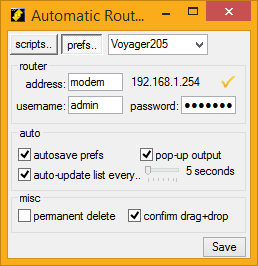
Here are the currently available (ARSE.ini) preferences.
Coloured entries cannot be set from the GUI, so if you want to alter those, hack your ini file..
[ARSE]
current_device=DSL-2680
autosave_prefs=true
autoupdate_list=true
update_frequency=5
permanent_delete=false
sleep_time=300		(time to wait between sending commands to device, in milliseconds default = 300)
log_level=2			(if you want to see output (next pref), leave this set to 2 - the default**)
show_output=true
confirm_drop=true	(confirmation of drag-and-drops scripts)
do_debug=false		(set to true to have a debug file left in the working dir)
log_file=			(this is best left blank - logs will be created in <data folder>\<device>\logs)
editor=notepad.exe	(enter the path to your own favourite text editor - for logs and ini files)
associate_files=true
** 0 = no logging, 1 = log authentication/login only, 2 = log all responses (the default).
Inside the default device folder, is a device.ini file, with settings and presets for that specific device. You can rename "default" to whatever you like, and create other folders next to it, for other devices, e.g..
C:\Users\<YOUR-USER-NAME>\AppData\Roaming\corz\ARSE\Voyager 205\
C:\Users\<YOUR-USER-NAME>\AppData\Roaming\corz\ARSE\DSL-2680\
These devices are then available from a drop-down menu.
You can switch devices from the drop-down menu, and ARSE will re-launch itself with the new device's scripts.
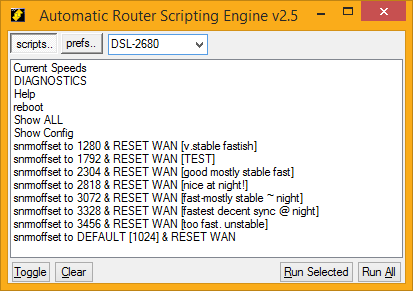
ARSE remembers window settings for each individual device (including the progress dialog and log output window). You can run multiple copies, each set just-so, remembering their own window sizes and positions.
Inside device.ini (the device settings) you can have four sections. A main [ARSE] section where you can override certain global prefs (those which make sense to be device-specific - changing these in the GUI will set these for the device), as well as three other sections.
Easier to give you an example - this is for a D-Link DSL-2680:
[ARSE]
log_level=2
show_output=true
sleep_time=400
log_file=
autosave_prefs=true

[device]
ip=modem
user=
password=MyPa55word
reboot_string=""	(optional: enter whatever command reboots the device - for scripts that require reboot)
auth_checkstring="Password:"	(optional - ARSE will look for this before sending the password)
login_chunks=2		(default is 8 - which is the number of 1KiB blocks to retrieve for login responses)
max_response=300 	(maximum amount of data blocks to retrieve in a single response, in KiB. Default is 300 - plenty!)
line_feed=LF		(what type of Line Breaks to use, default is CRLF. You can also use LF or CR)

[view]
width=375
height=247
x=1242
y=197
prog_x=518
prog_y=8
show_log_x=1258
show_log_y=45
show_log_w=664
show_log_h=999

[selected]
DIAGNOSTICS=True
Automatic Tasks..
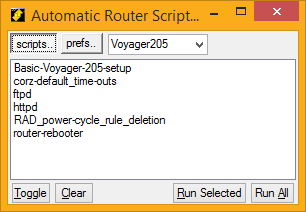
As well as its simple graphic interface, A.R.S.E. can operate command-line mode, so you can click a script anywhere and have it sent directly to the router. You can also drag-and-drop scripts directly onto A.R.S.E. - or a shortcut to it - and they will be sent immediately to the router via background telnet.
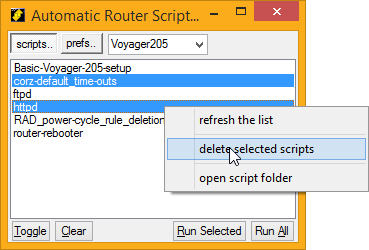
You can open your scripts folder from the A.R.S.E. scripts context menu (right-click any script in the list), though as you can add and delete scripts from right from within A.R.S.E., there shouldn't be much need to interact with the folder manually.
Command-line mode..



A.R.S.E. accepts script on the command line, which means you can drag-and-drop scripts onto the A.R.S.E. icon and A.R.S.E. will telnet them immediately to your router (and then exit). Or you can simply click a script anywhere in Windows Explorer and it will be sent to your router (so long as you have .arse files associated with A.R.S.E - you can do that from the A.R.S.E. system tray menu).
In a similar way, you can schedule script to be run at any time with, perhaps the Windows® built-in "Scheduled Tasks", or some other scheduling/macro software. There's no need to leave A.R.S.E. running, but if you do, it uses very little resources, and can be toggled by its tray icon (left-click).
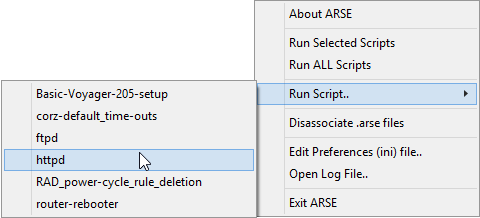
The currently available scripts are also available for running from A.R.S.E's system tray menu.
Note: in command-line mode, you will not be asked for any login preferences - unless the device.ini file is missing, i.e.. the first time you run A.R.S.E..
or GUI..
 If A.R.S.E. is launched without any scripts (i.e.. you click the application, or a shortcut on your desktop, Start Menu item, etc.),
it will present you with its simple graphic user interface and your current script collection. I put more controls into this as I go along, so check back often for the latest version.
In GUI mode, you can drag and drop scripts into the list, to add them to your collection (one at a time), and also delete scripts from your collection, as well as do a few more things; right-click the list.
It's okay to run scripts from the command-line or schedule while the A.R.S.E. GUI is running, they won't interfere with each other.
 Scripts are available for all sorts of things, mainly port-forwarding rules for p2p applications, ftp servers and the like, though technically, any valid telnet command can be placed in an A.R.S.E. script. Feel free to mail me your own pet scripts, and I'll chuck them here for all to use.
For scripters..
As mentioned, A.R.S.E. scripts are simply lists of valid telnet commands, the exact same commands one would enter in a telnet session with your device. A.R.S.E. scripts can also contain comments. Any line beginning with semicolon ";" or hash "#" is considered a comment.
The line format can be PC (CRLF - "\r\n") or UNIX (LF - "\n") line breaks, but NOT Mac (CR - "\r") sorree! - if your script jumps immediately to 100% progress, check your line-breaks.
Get More Scripts Here!
Progress..
You can also embed "progress directives" in your scripts, like this..
[I am a progress directive]
which will be used as the text under the progress bar while the script runs. So, if you have a big script, you can keep users informed about what section is currently being processed. Peek inside "Basic-Voyager-205-setup.arse" with any decent text editor for example usage.
Note: If your script requires that the router do a reboot at the end of you script, add reboot at the end of your script (after commit, for Voyager routers). Don't worry about multiple scripts sending multiple reboot (or commit) commands (and the long wait that entails); A.R.S.E. stores these commands and performs them only once, right at the end. If a reboot is required, A.R.S.E. will warn you first, and give you the option to defer that, if needed.
Exit codes..
If you are running scripts via Explorer, the command-line, a scheduled task or similar mechanism, you can grab A.R.S.E's exit code, so you know exactly what happened.
There are only a few of these, for now. As follows..
	 0	=	Normal Exit. OK.

	-2	=	Ini file not found.
	-3	=	Device not defined inside ini (prefs) file.

	-15	=	Login details incorrect.
	-16	=	Login aborted.
Download..
Download and use A.R.S.E., for free..
And finally..
All this work is free as in beer, so help yourself!
And when you save yourself some precious hours, days and weeks, maybe you could buy me a beer!
Changes (aka. "itstory")..
Embedded fresh from..
https://corz.org/engine?section=beta/windows/ARSE&source=version.nfoHave fun!
;o)
Before you ask a question..
PLEASE remember, this page is about ARSE, which is FREE!
If you want to ask questions about routers, go here.
Okay!
ARSE has its own page, and you're on it!
Feel free to leave comments, feedback, bug reports, suggestions, whatever, right here.
l*rz..
;o)
(or
Nice work (again), hope I can help with more stuff in the future
Hey! Cheers RichE!
I keep diving back into it as I learn more AutoIt (fantastic app!), and now ARSE has a cool tabbed interface, with a real preferences pane and all sorts! Check out the new screenshots above.
AutoIt sure is a handy thing to have around. Last night, after years of searching, I finally have a windows backup utility that does exactly what I want. Of course I had to write it myself, but with AutoIt, that's no biggie.
Power to the people!
;o)
(or
Excellent stuff!
I always dreaded having change anything on the 205, this is well easy. Thanks!
-jb-
Really appreciate the efforts excellent prog excellent site, did everything i needed it to
thanks again
using it to reboot my UTstarcom UT-300R2U modem/router...
sometimes the script works , sometimes not..
i'm working on my own script though.. will let u know when i finish.
Thanks guys! Somebody found the page, then.
Well, Viking, it's only designed for the Viking I routers, and doesn't really have a very intelligent login procedure (it searches the output for "failed", if I remember correctly.)
If you want to send me a copy of the terminal output for your router, I could take a look at adding support for other routers.
When you say "working on your own script", do you mean an ARSE script, or the ARSE source? If the former, then grab the latter and have a crack at adding support (notice use of word "adding" rather than "replacing") and I could meld it into the main release.
In the back of my mind somewhere is the notion of adding proper telnet emulation support so ARSE can become a sort of general telnet scripting tool, but for now, it's really only tested with Viking I routers.
If it does anything at all with any other routers, that's a bonus.
;o)
(or
Did it take longer to write the application or write the acronym
In fact, the acronym made itself up. It was only after I'd named it that I realized the faus pax. I laughed so long and loud I knew I HAD to keep the name!
The program took *much* longer.
;o)
(or
Thanks!
Hey Cheers!
If you dig my software, you might just love my new clock <- blatant plug
;o)
(or